WooCommerce product pages: titles, descriptions and SEO basics
WooCommerce gives you two description boxes, a slug and no SEO title field at all until you add a plugin. Here's what each field does, what to write in it and which settings quietly stop Google finding you.
Ashish · 7 min read
WooCommerce is flexible, which also means it leaves a lot to you. A new product page has a name, two description boxes, a pile of panels down the right and no obvious place for the title Google shows. Many store owners fill in the name and price, paste the supplier text into one of the boxes and hope.
This guide goes through each field that affects how a product page reads and how it's found, using WooCommerce's own documentation, then shows one product filled in properly. If you also sell on Shopify, our Shopify product description guide covers the same ideas with Shopify's field names.
First, two settings that can hide your whole store
Check these before writing anything, because a perfect product page doesn't help if search engines are told to ignore it.
- 1Search engine visibility. In WordPress, go to Settings, then Reading. If "Discourage search engines from indexing this site" is ticked, untick it. It's often left on from when the store was being built.
- 2Permalinks. Go to Settings, then Permalinks. With the "Plain" structure, product URLs look like
example.com/?product=111. With any other structure, they look likeexample.com/product/hoodie-with-logo(WooCommerce docs: permalinks). WooCommerce suggests keeping permalink structures short with words that relate to the content.
A warning on the second one: WooCommerce notes that changing permalink structures changes the URLs of existing products, and old links will return 404 errors unless you set up redirects. On a store that's already live, plan the redirects before you switch.
The product name
The Product name is the main title at the top of the product page. WooCommerce also uses it to create the slug (the last part of the URL) when you first save the product (WooCommerce docs: product editor).
Make it say what the product is, in the words a buyer would search:
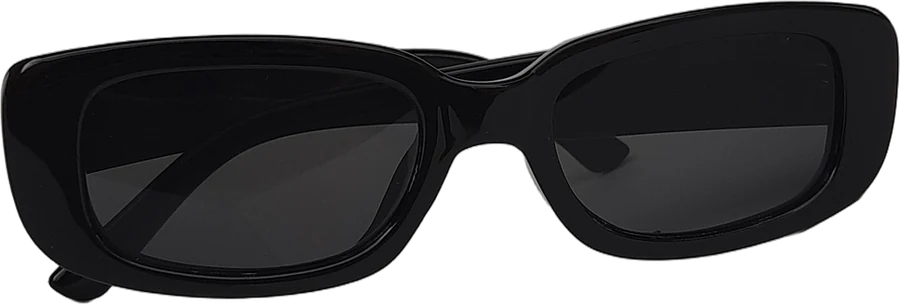
Polarized Cat-Eye Sunglasses, Black Acetate
Avoid internal names like "CE-BLK-v2" or "New Sunglasses". The product name is what shoppers and search engines see first.
The long description and the short description
WooCommerce has two description fields, and they do different jobs:
- Product description (the long one, in the main editor) is for the detailed description. It accepts text, images, video embeds and tables.
- Product short description is, in WooCommerce's words, "a succinct summary of the long description". It typically appears next to the product images, near the price. Exactly where depends on your theme, so check a live product page after writing it.
Many shoppers only read the short description, because it's next to the Add to cart button. Use it for the three or four things that decide the sale:
Polarized cat-eye sunglasses in hand-polished black acetate. UV400 lenses, spring hinges, 46 g. Includes a hard case and cloth.
Then use the long description for everything else: materials, sizing, how it fits, care, what's in the box, shipping and returns. WooCommerce's own advice on product descriptions is to start with what the product is, then fill the body with useful details like materials, dimensions, compatibility, care and what's included, one idea per bullet (WooCommerce: product descriptions that rank).
Don't paste the supplier's description as it is. If many stores use the same text, there's nothing on your page that makes it the one worth showing. For the writing itself, see our guide to writing product descriptions.
The slug
The slug is the end of the product URL, like /product/polarized-cat-eye-sunglasses-black. WooCommerce creates it from the product name, and changing the name later doesn't change the slug. To edit it, use the Edit button next to the URL below the product name, or the Slug panel, which is hidden by default and can be turned on in Screen Options.
Keep it short, readable and lower case. If the product is already live and has links pointing to it, set up a redirect before changing it.
The SEO title and meta description (you need a plugin)
This is the part that surprises people. WooCommerce and WordPress on their own don't give you a separate field for the page title and meta description that search engines show. Most stores add them with an SEO plugin, such as Yoast SEO, Rank Math or All in One SEO. Once installed, the plugin adds a box to the product editor with an SEO title, a meta description and a snippet preview.
What to write:
- SEO title: the main phrase near the start, a key detail, then your store name if it fits. About 60 characters or fewer is a sensible target, since longer titles are often shortened in results.
- Meta description: a unique summary for each product, with a reason to click. WooCommerce's guide suggests keeping it around or under 160 characters, and a formula of what it is, its most important attribute and a trust or logistics detail like shipping.
Each plugin has its own extra features and scores. Treat the scores as a hint, not a goal. A clear title that matches the product is worth more than a green light.
Image alt text
In the WordPress media library, each image has an Alternative Text field. It describes the image for people using screen readers and helps search engines understand it. Describe what's actually in the photo:
Black acetate cat-eye sunglasses folded on a white background
Use different alt text for each image in the gallery, since each shows something different.
Categories, tags and attributes
WooCommerce product tags don't work like Etsy tags. They're labels that group products on your own site, and each tag gets its own archive page (by default at /product-tag/your-tag). A handful of meaningful tags, like "polarized" or "gift ideas", can help shoppers browse. Dozens of near-duplicate tags just create thin pages with one product each.
Categories matter more. Put each product in a clear category, since category pages often rank for broader searches like "cat-eye sunglasses". Attributes, like colour or frame material, can show on the product page and power filters, depending on your theme.
A worked example
This is a made-up store and product to show the process. "Brightwater Eyewear" isn't a real brand.
| Field | Before | After |
|---|---|---|
| Product name | CE Sunglasses BLK | Polarized Cat-Eye Sunglasses, Black Acetate |
| Short description | (empty) | The two-sentence example above |
| Long description | Supplier text, pasted | Own words, with fit, care and what's included |
| Slug | /product/ce-sunglasses-blk | /product/polarized-cat-eye-sunglasses-black |
| SEO title | (no plugin installed) | Polarized Cat-Eye Sunglasses, Black - Brightwater |
| Meta description | (none) | Black acetate cat-eye sunglasses with polarized UV400 lenses and a hard case. Free UK delivery, 30-day returns. |
| Alt text | IMG_4471 | Black acetate cat-eye sunglasses folded on a white background |
The SEO title is 49 characters and the meta description is 111, both within the suggested lengths. Before switching the slug on a live store, the owner set up a redirect from the old URL.
If you're doing this for a full catalogue
Filling in seven fields for every product is where the time goes, especially when you're also listing the same products on marketplaces.
YelloShelf is a paid tool that drafts these fields. It doesn't have a free plan or trial. You buy a credit pack, starting at $10, and your first purchase comes with a money-back guarantee. You upload your product photos, and it writes a product name, a short and long description and SEO fields based on the product and what buyers search for. We're helping you remove the manual, tedious, time-consuming work. You still read it, edit it and paste it in yourself.
Quick checklist
- "Discourage search engines" is unticked in Settings, then Reading.
- Permalinks use a readable structure, with redirects planned for any change.
- Product name says what the product is.
- Short description covers the facts that decide the sale.
- Long description in your own words, easy to scan.
- Slug short and readable.
- SEO title and meta description set with an SEO plugin.
- Alt text on every product image.
- A clear category, and only a few meaningful tags.
FAQ
What's the difference between the WooCommerce short description and description?
The product description is the long, detailed one in the main editor. The short description is a brief summary that typically appears next to the product images, near the price. Use the short one for the key facts and the long one for full details.
Does WooCommerce have an SEO title field?
Not on its own. Most stores add an SEO title and meta description field with a plugin such as Yoast SEO, Rank Math or All in One SEO.
How do I change a product URL in WooCommerce?
Use the Edit button next to the URL below the product name, or turn on the Slug panel in Screen Options. Changing the product name doesn't change the slug. On a live product, set up a redirect from the old URL.
Do WooCommerce product tags help SEO?
Not the way Etsy tags do. WooCommerce tags group products on your own site and create archive pages. A few meaningful tags help shoppers browse, but many near-duplicate tags create thin pages.
Why isn't my WooCommerce store showing up on Google?
Check Settings, then Reading, in WordPress first. If "Discourage search engines from indexing this site" is ticked, search engines are asked not to index the store. Then check that your products have clear names, descriptions and readable URLs.
Made by the team behind YelloShelf
Rather not redo all of this for every product?
Upload your product photos and YelloShelf writes the title, description, bullet points, tags and a suggested price for each platform you sell on, from real market research. You check it, edit it and paste it in.
Try YelloShelf